OpenCode & OpenSpec: SDD in practice
Background
As a programmer, it’s hard not to be struck by how rapidly AI-assisted software development has evolved over the past few years. In hindsight, there have been several distinct phases:
- LLM-Powered Tab Completion: Developers still wrote most of the code themselves, while LLMs mainly predicted what should come next. Representative examples include Tabline and Copilot
- Vibe Coding: Developers no longer write code line by line. Instead, they describe requirements in natural language and let LLMs perform cross-file modifications. Representative examples include Cursor and Claude
- Spec-Driven Development (SDD): Vibe coding comes with many issues, such as context drift and unstable software architecture, which make it difficult to deploy reliably in production environments. As a result, both the open-source community and the industry have started exploring approaches beyond prompt engineering to enable LLMs to generate stable, production-quality code over long sessions — rather than just producing AI slop. At the moment, SDD appears to be one of the most promising directions.
How does SDD solve Vibe Coding’s problems?
Actually, the failure patterns are common in other areas involved in LLM. We only focus on the coding scenario.
First, we should ask: what exactly are the problems with vibe coding? From a workflow perspective, it usually looks something like this:
flowchart LR
    prompting --> gen("code generation (or regenerate)") --> fix
    fix --> gen
    fix --> dot("...")
    dot --> final("Success or failure")
The developer describes the desired changes in natural language (the prompting phase). This description is often ambiguous. The LLM then interprets the user’s intent and generates a modification plan (the code generation (or regeneration) phase). In most cases - at least based on my personal experience - the first version generated by LLM rarely captures my intent precisely. At that point, I provide additional feedback or corrections (the fix phase), and the LLM regenerates the code according to the new instructions.
This cycle repeats until either:
- The result finally becomes acceptable, or
- You realize it would have been faster to just write the code yourself
From my own experience, this workflow frequently leads to frustrations like these 🤕️
- Why is the LLM still generating code with outdated Python type hints (e.g., using
Dictinstead of the built-indict)? - Why do I have to repeatedly explain important constraints to the LLM?
- Why does the LLM ignore previously correct code and make large, unnecessary modifications instead?
Recently, I met a nice article which summarizes the failure patterns of vibe coding1
- Context Loss: The LLM always focuses on the last user prompt. The technical details aforementioned have lower priority, even though they still exist in the context window. LLM may even totally forget them.
- Assumption Drift: For any details not provided, the LLM will use some defaults (depends on the training data). However, the defaults may not be what you want
- Pattern Violation: As the assumption drift continues to accumulate, the final result gradually diverges from the original intent until it no longer satisfies your requirements in any meaningful way.
What makes this even more frustrating is that these failure modes tend to compound each other. Context loss forces users to repeatedly restate constraints, but those constraints are often expressed ambiguously in natural language. This, in turn, amplifies assumption drift over time, eventually leading to complete pattern violation1
Now that we understand the core problems of vibe coding, the next question is: how does SDD address them? SDD stands for Spec-Driven Development. Under the SDD workflow, coding begins not with implementation, but with writing a specification (Spec). From there, the system generates a detailed modification plan (Plan), breaks that plan down into multiple executable tasks (Task), and only then starts writing code (Code), as illustrated below.
flowchart LR
    spec --> plan --> tasks --> code
If we take a closer look at the three failure patterns, we will find that the real problem lies in the LLM does not receive the requirements clearly. Usually, the natural language description has some ambiguity. Therefore, the solution is quite straightforward: we should express our requirements in a clear way. Luckily, in the area of software engineering, we already have some artifacts for this purpose (e.g., architecture document, requirements document, etc.)
SDD Three Levels
Based on the relation between developers and spec/code, we may divide the SDD practice into three levels. The following tables show the differences2
| Spec-first | Spec-anchored | Spec-as-source | |
|---|---|---|---|
| 🔧 Maintainance target | code | spec + code | spec |
| 📝 Spec lifecycle | write once and throw away | evolve with code | always maintain the spec |
| 💰 Maintainance cost | 👑 zero | ❌ double | ❌ strong tests |
| 🔄 Determinism | — | ✅ align spec and code by developers | ❌ the same spec may produces different code |
To summarize:
- Spec-first: write spec first and use the artifact to guide code generation. The spec can be thrown away
- Spec-anchored: write spec first and use the artifact to guide code generation. However, we will keep the spec and always make sure that it aligns with the code. To this purpose, we always edit the spec before we touch code.
- Spec-as-source: write spec only and forget about code at all. We treat code like it’s a byproduct.
The Spec-as-source is quite interesting in my opinion. It reminds me of the relationship between source code and binary:
| Compilation | SDD | |
|---|---|---|
| source code | high-level programming language | spec |
| compile | compiler | LLM |
| binary | binary/bytecode | high-level programming language |
Today, almost nobody inspects the raw binaries or bytecode produced by a compiler. So the natural question is: could SDD eventually evolve into a similar paradigm — one where we no longer care about the exact code generated by the LLM, and instead focus entirely on the spec itself? Sean Grove from OpenAI has expressed a similar perspective3. From the standpoint of 2026, this vision still feels somewhat distant — but perhaps not that distant. In my view, the core challenge is how to control or constrain the inherent nondeterminism of LLMs. There has already been some early exploration in this direction, such as the SDD framework from Tessl
Why I chose OpenSpec
This post focuses on the spec-anchored stage.
There are some rules that must be followed when taking spec-anchored into practice:
- Spec lives with code and gets version-controlled: You should put the spec along with your code. The benefits are that the coding agent can both retrieve the spec and code
- Always change spec before change code: this practice ensures that the spec reflects what the code does.
- Check if code satisfies spec in code review: when reviewing code, make sure that the code does what the spec says.
I have been using OpenCode for quite a long time and have identified similar failure patterns. To remedy this, I always write a spec first and feed it into the LLM. However, I usually forget to update the spec when making code changes. After learning the SDD practice, I find that I’m in the spec-first level. Therefore, I want to shift to the spec-anchored level. After doing some research, I found the following choices;
- Kiro: a lightweight SDD implementation only need to maintain
requirements.md, design.md, tasks.md. However, it can not be used outside the Kiro IDE. - Tessl: it’s a experimental framework though.
- GitHub Spec Kit: a heavy SDD framework in my opnion. I read the quickstart documentation and practice myself. It reminds me of the waterfall model in the software engineering area - we need to plan everything we would and ensure the artifacts are of high quality. Only after that can we proceed with implementation.
- OpenSpec: The biggest advantage is fluid but not rigid. I also give it a shot and find that it perfectly meets my needs. It makes me feel more agile.
Below is a workflow comparison between GitHub Spec Kit and OpenSpec that I summarized based on their official documentation.
- Solid borders/lines: indicate steps or paths that are mandatory.
- Dashed borders/lines: indicate optional steps or paths.
- Colors: similar colors indicate stages that serve roughly the same purpose.
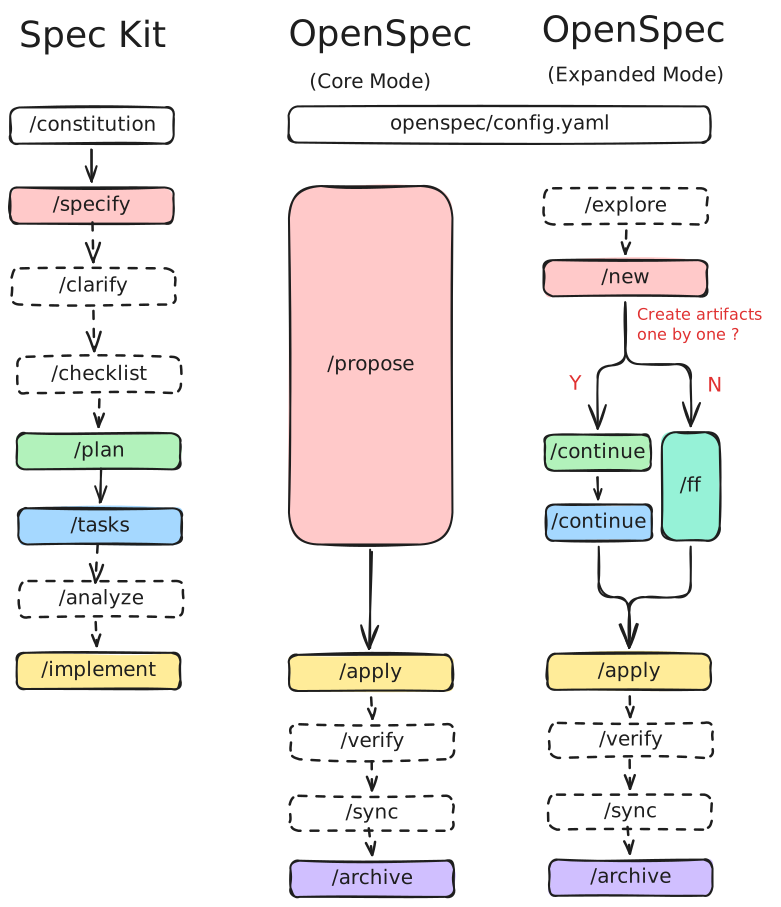
We can draw some conclusions here.
- In default settings, OpenSpec has 3 stages
/propose -> /apply -> /archive, which is less than GitHub Spec Kit’s 4 stages/specify -> /plan -> /tasks -> /implement. - OpenSpec’s
/propose$\approx$ GitHub Spec Kit’s/specify -> /plan -> /tasks. - OpenSpec has no corresponding
/constitutionstage. This stage will generate aCONSTITUTION.mdfile (similar to theAGENTS.md). You can edit theopenspec/config.yamlfile to achieve the same functionality. - OpenSpec has a special stage called
/archivethat merges the current spec into the main spec (I will explain this later). The GitHub Spec Kit has no corresponding stage. - OpenSpec offers two modes: core mode and expanded mode. The expanded mode allows for more control.
I strongly recommend trying these different SDD tools yourself. A good way to evaluate them is to implement the same feature with multiple SDD workflows and compare the experience directly. If you do not feel like doing that, I also found a well-written comparison created by someone else, which may help you choose an SDD tool :)
There are also several details not reflected in the diagram that I think are worth paying attention to:
- GitHub Spec Kit expects you to implement features on a new Git branch, while OpenSpec does not impose this requirement.
- The amount of artifacts generated by GitHub Spec Kit is significantly larger than OpenSpec, and the artifacts themselves are generally much more detailed in structure and format.
- GitHub Spec Kit’s workflow feels somewhat rigid and opinionated. For example, I noticed that when invoking
/implement, it may recommend postponing implementation if there are still unchecked items in the checklist. OpenSpec is different — many stages in its workflow are optional.
What mainly attracts me to OpenSpec is that its workflow and artifacts are much more lightweight. I can generate fewer artifacts with fewer commands, and the artifacts themselves are simpler. Another reason is that, since we are currently in the spec-anchored stage, we effectively need to maintain both the spec and the code. Longer specs mean developers have to read more words, and also consume 🔥 more tokens. Personally, I think overly detailed specs can reduce some of the practical benefits that SDD is supposed to bring.
Next, let’s look at what OpenSpec calls a delta spec. In simple terms, OpenSpec treats specs as something that should live alongside the codebase and evolve continuously as features are added, modified, or removed.
When you use the OpenSpec, you have these folders4
openspec/specsstores the global spec. It always reflects what the implementation does. Each module has an isolated sub-folder.openspec/changes/[feature]contains all the artifacts for a specific feature. It also has specs, but only contains added, modified, or removed parts.
openspec/
├── specs/
│   └── auth/
│       └── spec.md ◄────────────────┐
└── changes/                         │
    └── add-2fa/                     │
        ├── proposal.md              │
        ├── design.md                │ merge
        ├── tasks.md                 │
        └── specs/                   │
            └── auth/                │
                └── spec.md ─────────┘
Depending on the scenario, you may find that the spec.md under changes has the following structure.
## ADDED Requirements
### Requirement: ...
#### Scenario: ...

## MODIFIED Requirements
### Requirement: ...
#### Scenario: ...

## REMOVED Requirements
### Requirement: ...
#### Scenario: ...
When you request a merge with the /sync or /archive command, the OpenSpec will merge them into the main spec intelligently.
OpenCode & OpenSpec
As mentioned earlier, my primary programming tool is OpenCode. OpenSpec already provides official integration with it, and the setup is quite straightforward.
# Install OpenSpec first
$ npm install -g @fission-ai/openspec@latest

# Navigate to your project
$ cd your-project
$ openspec init
Follow the instructions and pick OpenCode. After the initialization, you will have the openspec folder like this.
openspec
├── changes
│   └── archive
├── config.yaml
└── specs
You will also get the related slash commands and skills under .opencode.
.opencode
├── commands
│   ├── opsx-apply.md
│   ├── opsx-archive.md
│   ├── opsx-explore.md
│   └── opsx-propose.md
└── skills
    ├── openspec-apply-change
    │   └── SKILL.md
    ├── openspec-archive-change
    │   └── SKILL.md
    ├── openspec-explore
    │   └── SKILL.md
    └── openspec-propose
└── SKILL.mdOpenSpec does not use AGENTS.md. To do the migration, move the file content into openspec/config.yaml. The details can be found on this page
From now on, just open the OpenCode and use the slash commands. For example, let’s say we want to implement a feature:
/opsx-propose "descriptions what the feature is".- Review the generated artifacts and manually edit them if needed.
- clear the context window with
/new. /opsx-apply.- clear the context window with
/new. /opsx-archive.
Wrap-up
To be honest, I found the coding agent yields more production-quality code with OpenSpec. What’s more, I have a living spec in my project.
-
https://agentfactory.panaversity.org/docs/General-Agents-Foundations/spec-driven-development/why-specs-beat-vibe-coding ↩︎ ↩︎
-
https://agentfactory.panaversity.org/docs/General-Agents-Foundations/spec-driven-development/three-levels-of-sdd ↩︎
-
https://github.com/Fission-AI/OpenSpec/blob/main/docs/concepts.md ↩︎